Workflow Templates Are the Missing Onboarding Layer for Agent Systems
The blank page is still one of the biggest adoption bottlenecks in agent systems. Packages solve reuse. Templates solve the first-project problem.
- workflow templates
- agent onboarding
- AI agent packaging
- agent project scaffolding
- agentpm new
- multi-agent workspaces
- agent infrastructure
Workflow Templates Are the Missing Onboarding Layer for Agent Systems#
The developer understands the idea of an agent system. They have read enough docs to know what tools are, what an SDK does, and why manifests and lockfiles matter. Then they try to build the first real project and stall before writing useful application code.
The stall usually looks mundane.
Which tools should this project install, and at what versions? Should the app use a Python SDK, a Node SDK, a shell workflow, an MCP server, or some multi-agent workspace layout? Where does the root manifest live? What belongs in package metadata versus app code? If another engineer clones the repo next week, what file explains the shape of the system?
That is a real adoption problem.
By 2025, most organizations experimenting with AI agents had already adopted them in some form, but far fewer were scaling them.[1] The gap is easy to misread as a model problem. A lot of it is a project-structure problem. An empirical study of Stack Overflow and GitHub Issues identified 77 distinct recurring technical challenges in agent development, with platform and integration friction ranking as the most persistent category across the entire study period.[2] The hard part is not always finding an agent framework. It is knowing how to structure the first real project.
Why Agent Packages Alone Don't Solve the First-Project Problem#
Package managers are very good at one thing: making a single artifact reusable.
That artifact might be a tool. It might be an agent package. It might be a skill, a knowledge artifact, or some other agent-system building block. Packages give that artifact identity, versioning, install semantics, and a lockfile-backed path into another project.
They do not give you a project.
That distinction is already familiar in normal software. npm can install react and react-dom. It does not tell you what your repo should look like, how your starter code should be organized, or what the first useful local command should be. That gap is why starters and scaffolds exist. The same gap appears in agent systems, except earlier, because the project shapes are less settled.
An installable tool is a building block. An installable agent package is a compositional building block. Neither one answers the next question a developer actually has:
- what should the repo look like?
- which execution surface should this project use?
- what starter code belongs in the app?
- what does the first useful command look like?
AgentPM’s product arc makes this distinction clear:
Package tools         -> installable, versioned, lockfile-backed
Package agents        -> composition as a versioned artifact
Generate projects     -> compose tools and agents into a runnable starting point
A package helps you reuse one artifact. A template helps you assemble a working system from many artifacts without starting from scratch.
That difference has measurable cost. Across a large developer population, AI-assisted tooling saves an average of 3.6 hours per week — not primarily from generating code faster, but from reducing time spent on configuration, startup decisions, and getting from a blank directory to a believable first run.[3] Agent systems carry that cost in concentrated form because the project shapes are still new to most teams.
What an AI Agent Workflow Template Should Generate#
A workflow template should not pretend to be a magic app generator. It should leave behind a project that an engineer can inspect, reason about, and modify immediately.
That means the output needs to be explicit.
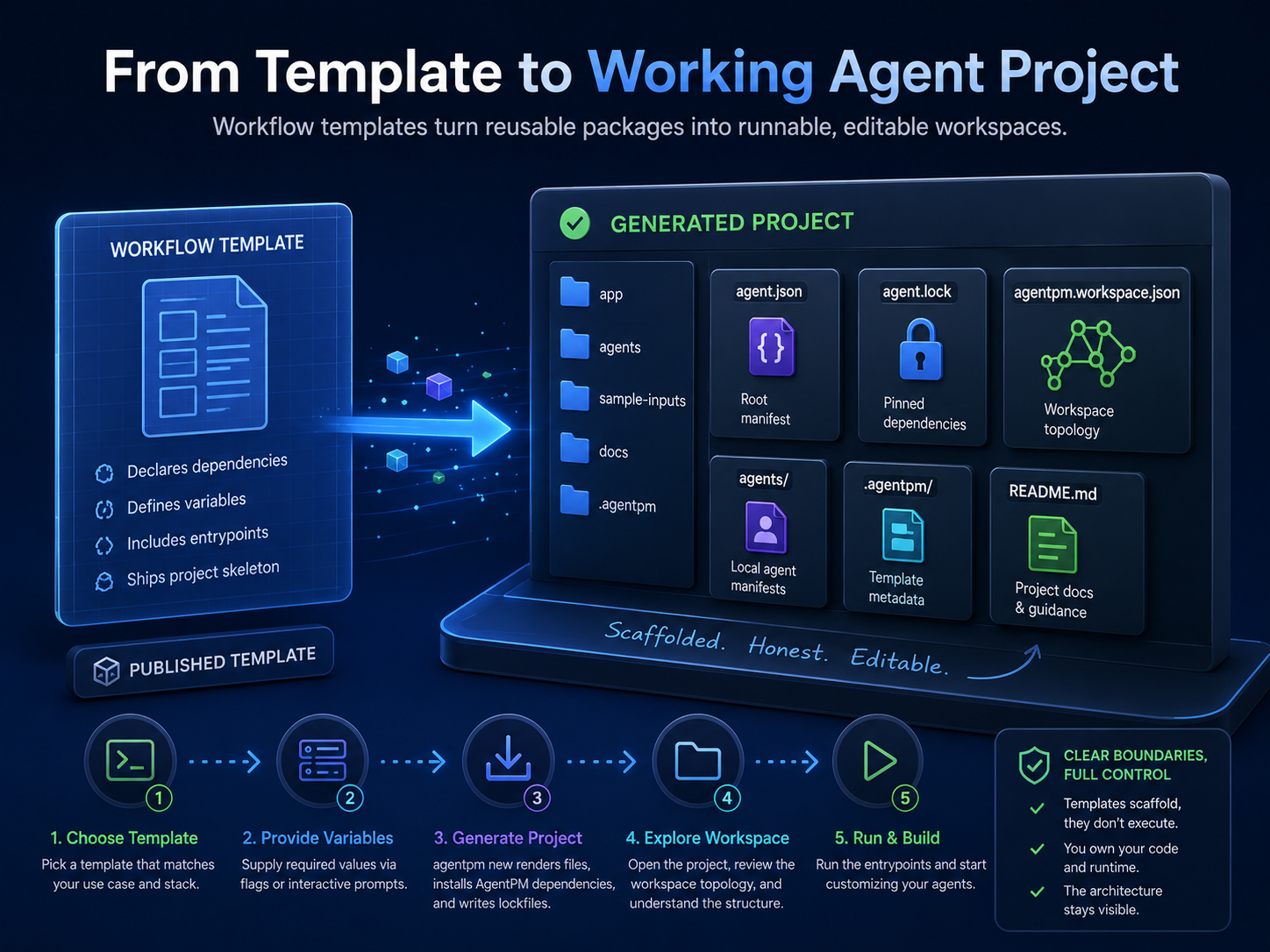
At minimum, a generated project should have:
agent.jsonfor the generated root manifestagent.lockfor runnable, pinned dependenciesagentpm.workspace.jsonfor committed workspace topology: local manifests and package roots.agentpm/template.jsonfor provenance: which template generated the project, at what version, with which non-secret variables- app code, a README, an
.env.example, and entrypoint commands that tell the user what to run next
If the scaffold needs extra local agent manifests, those should be files too:
agents/*.agent.json
The template package itself should declare what kind of project it is trying to scaffold:
use_caseexecution_surfacesstackfiles_rootvariablesdependencies.toolsdependencies.agentsentrypoints
Those fields are not decorative. They are the contract that lets the generated project be understandable from the first command.
The security boundary matters just as much as the structure. A workflow template should generate the project, not run it. It can copy files, render variables into text, install declared AgentPM packages, and print next steps. It should not execute template hooks, shell out to arbitrary commands, run package managers on the user’s behalf, or start the generated app automatically.
Templates will often contain shell scripts, starter app code, and runnable examples. Those are useful. They should still be visible before execution. The user should be able to read the generated script, inspect the manifest, check the lockfile, and decide what to run next.
The variable model follows the same rule. Generation-time variables are scaffold text. Project name. Display label. Example paths. They are not where API keys, passwords, or tokens belong. Runtime secrets should live in .env.example and environment variable declarations, not be collected during generation.
Multi-Agent Support Workspace: A Generated Project Walk-Through#
The clearest way to judge whether a template is doing the right thing is to look at a real one.
Take @zack/support-assistant-workspace, a multi-agent support workspace starter (source on GitHub). The point of a template like this is not to hide orchestration behind a fake runtime. The point is to scaffold a workspace that makes the topology visible from day one.
The template combines:
- one published agent root,
@zack/ops-console@0.1.0 - one direct tool dependency,
@zack/summarize-text@0.1.8 - local generated agent manifests under
agents/ - a synthesized root
agent.json - a generated
agent.lock - a generated
agentpm.workspace.json - starter app code, a README, and
.env.example
The command flow is simple:
agentpm new @zack/support-assistant-workspace my-support-agent
cd my-support-agent
cp .env.example .env.local
uv sync
uv run python app/main.py
cat agentpm.workspace.json
What matters is what the developer can see after each step.
After agentpm new, the project exists as files. Nothing needed to run in order for the topology to become understandable. There is a root manifest. There are local agent manifests. There is a lockfile. There is a workspace file.
After uv sync, Python app dependencies are installed, but the AgentPM package story was already pinned by agent.lock.
After uv run python app/main.py, the generated app executes its own code. AgentPM did not swallow orchestration into a hidden runtime layer. The runtime behavior still lives in the app, where teams can edit it.
After cat agentpm.workspace.json, the shape of the workspace is explicit:
{
  "schema_version": 1,
  "manifests": [
    "agent.json",
    "agents/answer-drafter.agent.json",
    "agents/escalation-reviewer.agent.json"
  ],
  "package_roots": {
    "agents": [{ "name": "@zack/ops-console", "version": "0.1.0" }],
    "tools": []
  }
}
That file says something important in plain terms.
manifests are the local, editable agent definitions that belong to this repo.
package_roots.agents are published agent packages installed into the workspace as roots.
Together, they describe the workspace without relying on hidden conventions or recursive manifest tricks.
That last point matters. A multi-agent workspace does not require one kind: "agent" manifest to start depending recursively on other agents. The workspace can be explicit instead. Local manifests stay local manifests. Published agent roots stay package roots. The app code decides how they work together.
Production multi-agent systems tend to work the same way. Multi-agent approaches are no longer niche, and the patterns that survive production share a common trait: explicit topology, explicit boundaries, and shared artifacts that more than one engineer can inspect.[4][5] Multi-agent workspaces need a manifest, not magic.
How Workflow Templates Should Reveal Agent System Architecture#
The temptation with scaffolding is to make it feel effortless by hiding more and more of the system. That works for the first demo. It often fails for the second engineer.
If the generated project runs but does not leave behind a mental model, the next person who touches it is back at the blank page. They just inherited more files.
A good workflow template leaves behind enough visibility that a teammate can answer a few concrete questions immediately:
- Which artifacts are local, and which came from packages?
- Which exact versions are installed?
- What commands should I run next?
- Which file describes the workspace topology?
- Which file owns the orchestration logic?
Those questions map to actual files:
- artifact identity:
agent.jsonandagent.lock - package provenance:
.agentpm/template.json - workspace topology:
agentpm.workspace.json - orchestration: the generated app code
Packages are the reusable parts. Templates are the recommended starting assemblies. Generated apps are where teams customize and orchestrate.
AgentPM does not need to own the workflow runtime for templates to be valuable. It needs to package the artifacts, pin the dependencies, generate the topology, and leave the resulting project understandable enough to edit. Templates are the bridge between reusable packages and real application work.
The blank page sits right in that gap. Many teams already understand why versioned packages matter. Fewer have a dependable way to turn those packages into a first project shape that another engineer can run, inspect, and extend. Workflow templates reduce that friction without hiding the architecture that made the project work in the first place.
That is the only onboarding layer worth trusting.
The best workflow templates do not hide the system. They make the first version of the system visible enough to run, edit, and understand.
Sources#
- PwC, “AI Agent Survey.”: https://www.pwc.com/us/en/tech-effect/ai-analytics/ai-agent-survey.html
- “What Challenges Do Developers Face in AI Agent Systems? An Empirical Study on Stack Overflow & GitHub Issues.” arXiv.25423.: https://arxiv.org/abs/2510.25423
- Panto, “AI Coding Statistics — Adoption, Productivity & Market Metrics.”: https://www.getpanto.ai/blog/ai-coding-assistant-statistics
- Lyzr, “The State of AI Agents in Enterprise: Q1 2026.”: https://www.lyzr.ai/state-of-ai-agents/
- Openlayer, “Multi-Agent Architecture Guide.”: https://www.openlayer.com/blog/post/multi-agent-system-architecture-guide